Wiring
Smart Sync System Wiring

Wiring of the system will vary depending on the total length of waterfalls installed as well as the total number of waterfalls installed.
Diagram for Over 10FT of Waterfalls
Diagram for Two Waterfalls
Diagram for Waterfalls with Other Lighting Products

Diagram for One Waterfall Under 10FT

Diagram for Over 10FT of Waterfalls

Diagram for Two Waterfalls

Diagram for Waterfalls with Other Lighting Products
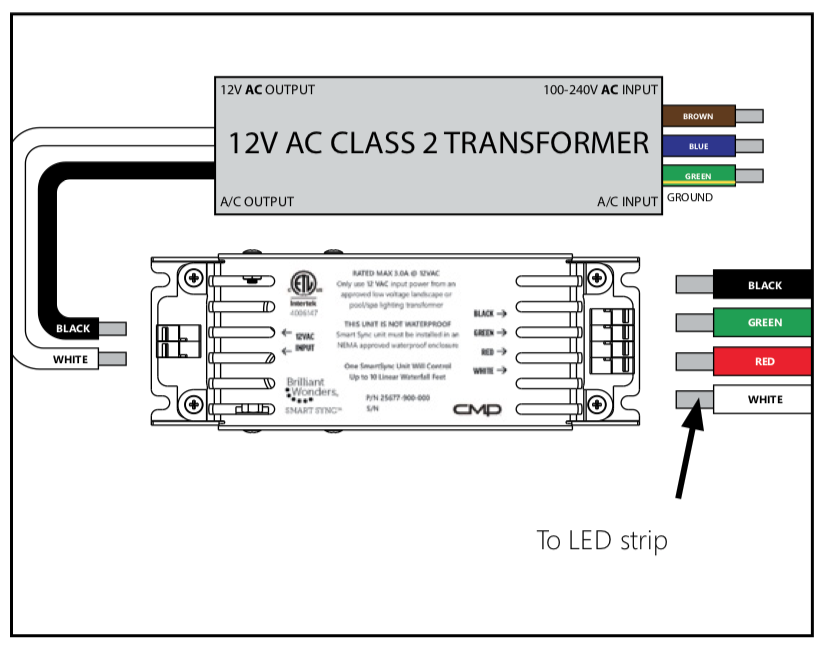
System Wiring
Brilliant Wonders Smart Sync Adapter requires a 12V AC transformer (not included) in between controller and Brilliant Wonders Smart Sync Box.
Use the Smart Sync Adapter option for Waterfalls installed with other LED products and most major pool automation systems.
Note: The Color Wheel Control and Smart Sync Adapter are incompatible and should not be used together.
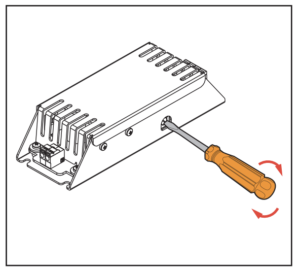
Dial Setting
Using a flathead screwdriver, turn the dial clock-wise until the desired program is selected.
J-Style = Dial Setting 1
H-Style = Dial Setting 2
P-Style = Dial Setting 3

Mounting
Mount Smart Sync control box in a NEMA approved weatherproof enclosure (mounting screws not included).
Recommend CMP Part #: 25650-100-210

Wire Placement
Line up the correct color combination before attaching.
Attach wires to control box by pressing button and inserting wires.
Smart Sync Adapter Wiring

Congratulations!
You have completed this chapter. To go to the next chapter, click next. To go back to the Chapter Table of Contents, click done.