System Start-Up

Check For Leaks
Use a slotted screwdriver to turn the door latches a half-turn counter-clockwise to open the door and open door cover.
Confirm that fittings are not leaking. Replace cover and close the door.

Check Power and Flow Lights
The DEL AOP 50 has two external indicator lights, red and green, on its left side. When the DEL AOP 50 has power, the green power light will illuminate. If power light does not come on, check electrical connections.
The red flow indicator may be on momentarily. Once adequate water is flowing, the red flow indicator will go out.
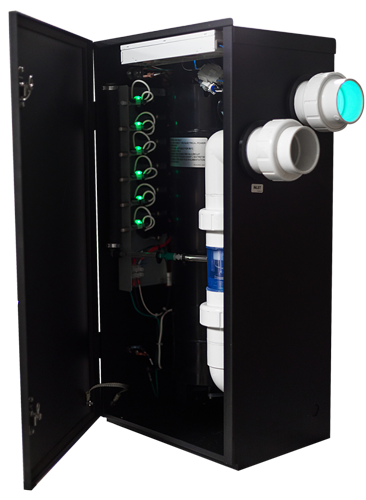
Check Ozone and UV
With door open, check ozone cells and confirm indicator lights are glowing. UV chambers should glow a yellow/green color when on.
If UV or Ozone are not operating and unit has power, contact support.
Use the screwdriver to turn the door latches a half-turn clockwise to secure.

Prepare Pool Water
The pool must be as clean as possible prior to AOP 50 installation.
Backwash or clean filters one day before starting the ozone generator. Run pool filtration continuously for 24 hours prior to starting the ozone system.
Super chlorinate pool water using a chlorine-based shock treatment so the water has a sustained 1-3 ppm free chlorine level.
Test pool chemistry and adjust pH between 7.4 and 7.6. Adjust total alkalinity between 80 and 120 ppm.

Congratulations!
You have completed this chapter. To go to the next chapter, click next. To go back to the Chapter Table of Contents, click done.